BarberCo
BarberCo.Api
The backend that ties everything together
The API is an ASP.NET Core (.NET 10) Web API backed by EF Core and PostgreSQL. It's the single backend serving both barberco-web and BarberCo.Management.
Security is layered: JWT for user sessions and API-key auth for service-to-service calls.
- ASP.NET Core
- .NET 10
- EF Core
- PostgreSQL
- JWT
- Twilio
Features
Architecture — DI, interfaces & repositories
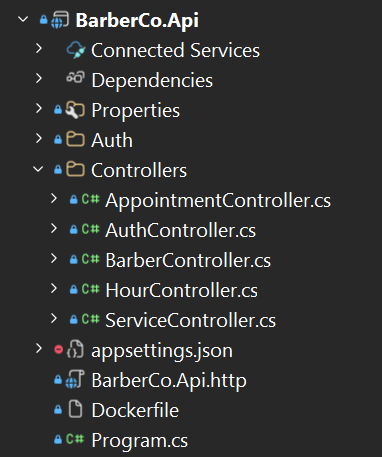
The backend is built around separation of concerns and dependency injection. It's a multi-project solution: the API project handles HTTP, a DataAccess project owns the repositories and EF Core, and a SharedLibrary holds the DTOs and domain models. Controllers stay deliberately thin — they deal with HTTP and delegate every bit of real work to a repository behind an interface.
Each repository is defined by an interface first. That interface is the contract the rest of the app codes against:
public interface IAppointmentRepo
{
    Task<List<Appointment>> GetAllAppointmentsAsync(CancellationToken token);
    Task<Appointment> CreateAppointmentWebAsync(AppointmentUpdateDto newAppointment, CancellationToken token);
    Task<Appointment> CreateAppointmentManagementAsync(AppointmentUpdateDto newAppointment, string createdByBarberId, CancellationToken token);
    Task<AppointmentUpdateDto?> ConfirmAppointmentAsync(AppointmentConfirmationDto dto, CancellationToken token);
    Task<Appointment?> GetAppointmentByIdAsync(int id, CancellationToken token);
    Task DeleteAsync(Appointment appointment, CancellationToken token);
}
The controller depends only on that interface — injected through its constructor — and does nothing but translate between HTTP and the repository, mapping domain exceptions to the right status codes. There's no business logic in the controller at all:
public class AppointmentController : Controller
{
    private readonly IAppointmentRepo _apptRepo;
    private readonly ILogger<AppointmentController> _logger;

    public AppointmentController(IAppointmentRepo apptRepo, ILogger<AppointmentController> logger)
    {
        _apptRepo = apptRepo;
        _logger = logger;
    }

    [HttpPost("create/web")]
    [Authorize(AuthenticationSchemes = "ApiKey")]
    public async Task<ActionResult<int>> CreateAppointment([FromBody] AppointmentUpdateDto newAppt, CancellationToken token)
    {
        try
        {
            var result = await _apptRepo.CreateAppointmentWebAsync(newAppt, token);
            return Ok(result.Id);
        }
        catch (DataValidationException ex)
        {
            return StatusCode(StatusCodes.Status422UnprocessableEntity, ex.Message);
        }
        catch (Exception ex)
        {
            _logger.LogError(ex, ex.Message);
            return StatusCode(StatusCodes.Status500InternalServerError, "An error occurred while processing your request.");
        }
    }
}
Everything is wired up in Program.cs with .NET's built-in DI container, registering each implementation against its interface. Because callers only know the interface, swapping an implementation is a one-line change — which is exactly how the dev-time Telegram SMS mock gets substituted for Twilio:
// Repositories registered against their interfaces
builder.Services.AddTransient<IBarberRepo, BarberRepo>();
builder.Services.AddTransient<IHourRepo, HourRepo>();
builder.Services.AddTransient<IServiceRepo, ServiceRepo>();
builder.Services.AddTransient<IAppointmentRepo, AppointmentRepo>();

// Same ITwilioRepo contract, different implementation per build config
#if DEBUG
builder.Services.AddHttpClient<ITwilioRepo, TwilioTestingRepo>();
#else
builder.Services.AddHttpClient<ITwilioRepo, TwilioRepo>();
#endif
The payoff: transport, business logic and data access stay cleanly separated, implementations are swappable, and everything is trivially mockable for testing.
Authentication & authorization
The API runs two authentication schemes side by side, both registered in Program.cs: JWT bearer tokens for interactive users, and a custom API-key scheme for trusted service-to-service callers.
JWT is the default scheme, with strict token validation — issuer, audience and signing key are all checked, role claims are mapped, and clock skew is set to zero so tokens expire exactly on time. The API key is then added as a second named scheme ("ApiKey") backed by a custom ApiKeyAuthenticationHandler:
builder.Services.AddAuthentication(cfg =>
{
    cfg.DefaultAuthenticateScheme = JwtBearerDefaults.AuthenticationScheme;
    cfg.DefaultChallengeScheme = JwtBearerDefaults.AuthenticationScheme;
    cfg.DefaultScheme = JwtBearerDefaults.AuthenticationScheme;
})
.AddJwtBearer(options =>
{
    options.TokenValidationParameters = new TokenValidationParameters
    {
        ValidateIssuerSigningKey = true,
        IssuerSigningKey = new SymmetricSecurityKey(Encoding.UTF8.GetBytes(jwtKey!)),
        ValidIssuer = issuer,
        ValidAudience = audience,
        ValidateIssuer = true,
        ValidateAudience = true,
        RoleClaimType = ClaimTypes.Role,
        ClockSkew = TimeSpan.Zero, // tokens expire exactly on time
    };
})
// A second, custom scheme for trusted service-to-service callers
.AddScheme<AuthenticationSchemeOptions, ApiKeyAuthenticationHandler>("ApiKey", options => { });
Each endpoint then opts into whichever scheme(s) it accepts. Reads that the management app and other services need can allow either "Bearer" or "ApiKey", while sensitive writes are locked down to "Bearer" only — i.e. a genuinely logged-in user:
[HttpGet()]
[Authorize(AuthenticationSchemes = "Bearer,ApiKey")] // either scheme can read
public async Task<ActionResult<List<Hour>>> GetAllHours(CancellationToken token)
{
    var hours = await _hourRepo.GetAllHoursAsync(token);
    return Ok(hours);
}

[HttpPut("{id}")]
[Authorize(AuthenticationSchemes = "Bearer")] // writes require a logged-in user
public async Task<ActionResult<Hour>> PutHour(int id, [FromBody] HourUpdateDto hour, CancellationToken token)
{
    var original = await _hourRepo.GetHourByIdAsync(id, token);
    if (original is null) return NotFound();

    return Ok(await _hourRepo.UpdateHourAsync(original, hour, token));
}
It also goes finer-grained than the scheme: endpoints can require a specific role. Registering a new barber, for example, demands a "Bearer" token that additionally carries the "admin" role — so even an authenticated non-admin is turned away:
[Authorize(AuthenticationSchemes = "Bearer", Roles = "admin")] // admins only
[HttpPost("register")]
public async Task<ActionResult<BarberDto>> RegisterBarber([FromBody] BarberRegistrationDto barberDto, CancellationToken token)
{
    var result = await _barberRepo.RegisterNewBarberAsync(barberDto);
    if (result.Errors != null) return BadRequest(result.Errors);

    return Ok(result.BarberDto);
}
Data layer (EF Core + PostgreSQL)
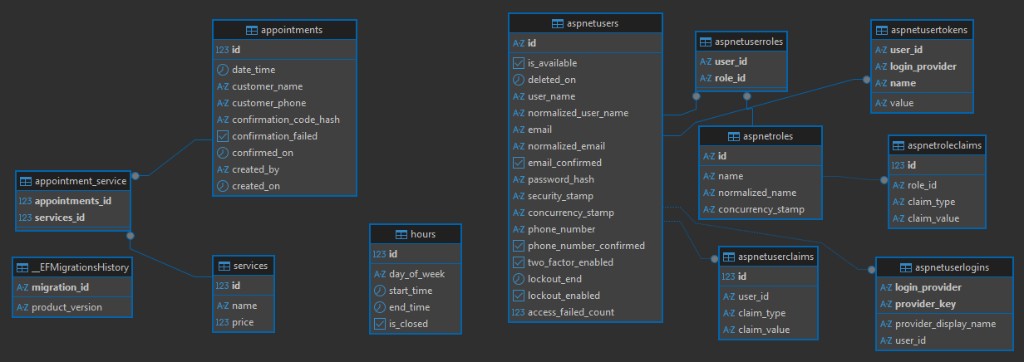
The data layer is EF Core (code-first) on PostgreSQL. The DataContext extends IdentityDbContext<Barber>, so ASP.NET Identity is baked in — Barber is the user entity — and the shop's own domain entities live right alongside it as DbSets: Hours, Services and Appointments.
public class DataContext : IdentityDbContext<Barber>
{
    public DataContext(DbContextOptions<DataContext> options) : base(options) { }

    public DbSet<Hour> Hours { get; set; }
    public DbSet<Service> Services { get; set; }
    public DbSet<Appointment> Appointments { get; set; }

    protected override void OnModelCreating(ModelBuilder builder)
    {
        base.OnModelCreating(builder);

        // Map ASP.NET Identity onto existing lower-case tables
        builder.Entity<Barber>().ToTable("aspnetusers");
        builder.Entity<IdentityRole>().ToTable("aspnetroles");
        builder.Entity<IdentityUserClaim<string>>().ToTable("aspnetuserclaims");
        builder.Entity<IdentityUserLogin<string>>().ToTable("aspnetuserlogins");
        builder.Entity<IdentityUserToken<string>>().ToTable("aspnetusertokens");
        builder.Entity<IdentityRoleClaim<string>>().ToTable("aspnetroleclaims");
        builder.Entity<IdentityUserRole<string>>().ToTable("aspnetuserroles");
    }
}
OnModelCreating uses the Fluent API to map the Identity types onto explicit lower-case table names (Barber → aspnetusers, IdentityRole → aspnetroles, and so on). That keeps the schema consistent with the project's naming convention instead of EF's defaults.
The result is a single, clean relational schema where the booking domain and the auth/identity tables sit together:
Twilio integration
Booking confirmations are delivered by SMS. The sender sits behind an ITwilioRepo interface, so the rest of the app just calls SendSMSAsync — it neither knows nor cares how the message actually leaves the building.
The production implementation, TwilioRepo, posts to Twilio's Messages API. It reads the AccountSid, AuthToken and from-number out of configuration (throwing a clear error if any are missing), wires up Basic auth, and sends a form-encoded To/From/Body — surfacing Twilio's own error text if a send fails.
public class TwilioRepo : ITwilioRepo
{
    private readonly HttpClient _http;
    private readonly string _fromNumber;
    private readonly string _messagesUrl;

    public TwilioRepo(HttpClient http, IConfiguration config)
    {
        _http = http;
        var accountSid = config["Twilio:AccountSid"]
            ?? throw new InvalidOperationException("Twilio:AccountSid is not configured");
        var authToken = config["Twilio:AuthToken"]
            ?? throw new InvalidOperationException("Twilio:AuthToken is not configured");
        _fromNumber = config["Twilio:FromPhoneNumber"]
            ?? throw new InvalidOperationException("Twilio:FromPhoneNumber is not configured");

        _messagesUrl = $"https://api.twilio.com/2010-04-01/Accounts/{accountSid}/Messages.json";
        var basic = Convert.ToBase64String(Encoding.UTF8.GetBytes($"{accountSid}:{authToken}"));
        _http.DefaultRequestHeaders.Authorization = new AuthenticationHeaderValue("Basic", basic);
    }

    public async Task SendSMSAsync(TextMessageDto dto)
    {
        var form = new FormUrlEncodedContent(new[]
        {
            new KeyValuePair<string, string>("To", dto.ToPhoneNumber),
            new KeyValuePair<string, string>("From", _fromNumber),
            new KeyValuePair<string, string>("Body", dto.Message),
        });

        var response = await _http.PostAsync(_messagesUrl, form);
        if (!response.IsSuccessStatusCode)
        {
            var error = await response.Content.ReadAsStringAsync();
            throw new HttpRequestException($"Twilio SMS send failed ({(int)response.StatusCode}): {error}");
        }
    }
}
For development I didn't want to burn real SMS credits or require a Twilio account just to test the flow. So I mocked the interface with a second implementation, TwilioTestingRepo, that fulfils the exact same ITwilioRepo contract — but instead of Twilio it forwards the message to a Telegram bot via sendMessage, using a development-only config section. Because both classes implement ITwilioRepo, switching between them is a one-line dependency-injection change; no calling code is touched:
// testing only — same ITwilioRepo contract, routed to Telegram
public class TwilioTestingRepo : ITwilioRepo
{
    private readonly HttpClient _http;
    private readonly IConfiguration _config;

    public TwilioTestingRepo(HttpClient http, IConfiguration config)
    {
        _http = http;
        _config = config;
    }

    public async Task SendSMSAsync(TextMessageDto dto)
    {
        var token = _config["SMSAlternativeTelegramDevelopmentOnly:token"]
            ?? throw new InvalidOperationException("SMSAlternativeTelegramDevelopmentOnly:token");
        var chatId = _config["SMSAlternativeTelegramDevelopmentOnly:chat_id"]
            ?? throw new InvalidOperationException("SMSAlternativeTelegramDevelopmentOnly:chat_id");

        var url = $"https://api.telegram.org/bot{token}/sendMessage";
        using var content = new FormUrlEncodedContent(new Dictionary<string, string>
        {
            ["chat_id"] = chatId,
            ["text"] = "SMS testing codes from barberco " + dto.Message,
            ["disable_notification"] = "true"
        });

        (await _http.PostAsync(url, content)).EnsureSuccessStatusCode();
    }
}
The confirmation code itself is handled carefully. When confirmation is enabled, a 6-digit code is generated with the cryptographically-secure RandomNumberGenerator, sent through the SMS sender, and then only its hash is stored — the plaintext code never touches the database.
private string GenerateConfirmationCode()
{
    int value = RandomNumberGenerator.GetInt32(0, 1_000_000);
    return value.ToString("D6");
}

private string HashCode(string code)
{
    var message = Encoding.UTF8.GetBytes(code);
    var pepper = Encoding.UTF8.GetBytes(
        _config.GetValue<string>("SMSConfirmationCodePepper")
        ?? throw new InvalidOperationException("SMSConfirmationCodePepper not configured"));

    using var hmac = new HMACSHA256(pepper);
    var hash = hmac.ComputeHash(message);
    return Convert.ToBase64String(hash);
}Rather than a plain hash (or a per-row salt), the code is run through HMAC-SHA256 keyed with a server-side secret "pepper" loaded from config (SMSConfirmationCodePepper). Because the pepper lives only on the server and never in the database, a leaked table is useless for reversing or replaying codes — and a short 6-digit space stays safe from offline guessing.
Verification hashes the submitted code the same way and compares it to the stored hash with CryptographicOperations.FixedTimeEquals — a constant-time comparison that avoids leaking information through timing. Codes also expire after 5 minutes, and a single wrong attempt marks the appointment as failed, so there's no room to brute-force.
One deliberate twist for the public demo: I don't run a live Twilio account. Getting a real number provisioned for A2P SMS means carrier registration and compliance overhead I didn't want for a portfolio piece — so the production build skips the real text send, and the confirm step also accepts a magic code, 111111, alongside the genuine hash check. That lets anyone walk the full book-and-confirm flow on the live site without a message ever going out, while the Telegram mock covers the same path in development.
Containerized delivery & CI/CD
Each app ships as its own container image. The API uses a multi-stage Dockerfile: it restores and publishes with the .NET SDK image, then copies just the published output into the smaller ASP.NET runtime image. The final image runs as a non-root user and enables forwarded headers, since it sits behind an nginx reverse proxy:
# Build stage
FROM mcr.microsoft.com/dotnet/sdk:10.0 AS build
WORKDIR /src

# Copy csproj files first and restore (better layer caching)
COPY ["BarberCo.Api/BarberCo.Api.csproj", "BarberCo.Api/"]
COPY ["BarberCo.DataAccess/BarberCo.DataAccess.csproj", "BarberCo.DataAccess/"]
COPY ["BarberCo.SharedLibrary/BarberCo.SharedLibrary.csproj", "BarberCo.SharedLibrary/"]
RUN dotnet restore "BarberCo.Api/BarberCo.Api.csproj"

COPY . .
RUN dotnet publish "BarberCo.Api/BarberCo.Api.csproj" -c Release -o /app/publish /p:UseAppHost=false

# Runtime stage — smaller image, no SDK
FROM mcr.microsoft.com/dotnet/aspnet:10.0 AS final
WORKDIR /app

# Run as a non-root user
RUN useradd -m -s /usr/sbin/nologin appuser
COPY --from=publish /app/publish .
RUN chown -R appuser:appuser /app
USER appuser

EXPOSE 80
ENV ASPNETCORE_URLS=http://+:80 \
    ASPNETCORE_FORWARDEDHEADERS_ENABLED=true

ENTRYPOINT ["dotnet", "BarberCo.Api.dll"]
Deployment is fully automated with GitHub Actions. On a push to master, a detect job reads each app's declared version (from package.json / .csproj) and skips anything whose image already exists in the registry. A matrix build then builds and pushes only the changed images to GHCR, and a final job SSHes into the self-hosted Linux server to roll them out — version-gated, so nothing rebuilds or redeploys unless it actually changed:
name: Deploy
on:
  push:
    branches: [master]
  workflow_dispatch: # manual "one click" button

env:
  REGISTRY: ghcr.io/westonburk

jobs:
  # 1) Decide which services changed (by declared version) and need building
  detect:
    runs-on: ubuntu-latest
    outputs:
      matrix: ${{ steps.set.outputs.matrix }}
      changed: ${{ steps.set.outputs.changed }}
    # ...reads versions, skips images already present in GHCR

  # 2) Build + push only the changed images (matrix comes from step 1)
  build:
    needs: detect
    if: needs.detect.outputs.any == 'true'
    runs-on: ubuntu-latest
    strategy:
      matrix: ${{ fromJSON(needs.detect.outputs.matrix) }}
    steps:
      - uses: actions/checkout@v5
      - uses: docker/setup-buildx-action@v3
      - uses: docker/build-push-action@v6
        with:
          context: ${{ matrix.context }}
          file: ${{ matrix.dockerfile }}
          push: true
          tags: ${{ matrix.image }}:${{ matrix.version }}
          cache-from: type=gha
          cache-to: type=gha,mode=max

  # 3) SSH to the server and roll out new images (migrations run on startup)
  deploy:
    needs: [detect, build]
    runs-on: ubuntu-latest
    steps:
      - uses: appleboy/ssh-action@v1.2.0
        with:
          host: ${{ secrets.SSH_HOST }}
          key: ${{ secrets.SSH_KEY }}
          script: |
            cd /opt/barberco
            for svc in $CHANGED; do
              docker compose pull "$svc"
              docker compose up -d "$svc"
            done
            docker image prune -f
On the server the three images run as services behind nginx, wired together by a docker-compose file (kept on the host, outside the repo, since it holds environment-specific config and secrets). EF Core migrations are applied automatically on API startup, so a deploy is just "pull the new image and restart the service."